Showing posts with label Technology. Show all posts

Thursday, March 17, 2011

Why I dont like iPhone

okay, go out there and show off you iPhone (not around tech geeks please.... you'll get slammed to the ground) and who wouldn't say "WOWWWWW!!!! iPHONE!!!" heck, you might even get 2-syllables damn with that... at that time you might feel cloud 9, nothing makes you happier than people admiring your iPhone... and for that purpose, I'd say Steve Jobs really do his jobs... the iPhone have become a cult... it's like to coolest thing ever exist in the world and become one of the things to own at least once in life...

But what if I'd say, iPhone is actually overrated????

So, what makes me dont really like the thing that deemed to be the coolest thing in the world??? let's not talk about that first... why not we give some praise and compliment first...

The positive of iPhone:-
  1. The display is pretty sharp... though I think Samsung Galaxy S running android isn't that bad either... however I do think Apple's iPhone is a little bit better in this area... but really, when running games and apps I can't see any different between iPhone and Galaxy S.... Perhaps I haven't encounter games and apps optimized for Retinal Display yet???
  2. The sensitivity of the touchscreen... I had to say it's supersensitive... a little touch is good enough for it to register with minimal mis-register...
  3. The effect... I had to say iOS has the best beautiful transition effects... changing menu, opening apps, all have its own effect...
  4. The look and reputation... like I said earlier, ppl will "WOW" and it looks so expensive...
  5. Touch Focus!!! OMG, this is something new... I dont know if any Android have this, but it's very cool... to let your camera focus on the object, touch it... fuuuuuuuuuuu.....

The so-so:-
  1. Battery life... I dont think the battery life is something amazing... but good enough... full charge can last me till night... around 12hrs.... for a new battery, I will be mad if it's less than that with my usage (facebook, twitter, sms... mainly internet)
  2. The function... for a mere phone, it's as good as other phones... can sms, mms, make calls, receive calls... download apps for some additional features to improve your experience like games, multimedia... while Apps Store has large chunk of apps to download, Android Market does this too...
  3. The charging time... I had a feeling it's not any faster compare to other phones... well, i'm charging on USB anyway, of course it is... 500mA isn't gonna do much... though the 1A power adapter is pretty fast... but if charging for 3 - 4 hours gonna last you next 12 hours, i have no grudge about it...

The negative about iPhone:-
  1. One serious thing, why the heck we can't choose the network we want to be on??? I mean, it's ok you only want to put us on Verizon, AT&T, T-Mobile, Maxis, DiGi, Celcom.... heck, I dont care anymore... back and forth they're almost the same (at least Maxis, DiGi and Celcom) but when you dont give us a chance to choose to be on UMTS or GSM, that hurts me you know... the bad thing about phones/mobile broadband modem is, they dont have enough intelligence when not to prefer higher bandwidth signal...
    • Like when you had one bar of 3G signal and comparing to 4 bar of EDGE, you should always prefer EDGE compare to 3G but most device will still prefer 3G and end up sucky connection, this is the thing that happening to iPhone 4
    • Some device might even always prefer to slower EDGE connection even 3G signal is good in the area just because EDGE has stronger signal while 3G signal will provide better bandwidth... however this wasn't the case with iPhone...
    • With other phone like Nokia that I used before (heck even mobile broadband modems too) will let us choose to use between UMTS or GSM or just let the phone choose... because of device auto preference is always stupid, I choose UMTS for the whole time unless I'm traveling far away...
    • Somehow in iPhone this thing is missing and it's killing me when it keeps on switching between UMTS and GSM. Ok, Jailbraking will solve the problem but that's not my option... my old Nokia dont even have to be hacked for me to have this options...
  2. The OS... while it's one of the most beautiful aesthetically, it's one of the inefficient way of implementation... especially the multi-tasking (but I really prefer to call it fast app switching instead...)
    • Apple somehow have high confidence that their phone won't crash even when the memory overloaded like what happened to Nokia's Symbian... the thing is, you can't quit your apps... you have to terminate it... it's like when you running Microsoft Office on your computer, you dont have the "X" button on your top right, but instead you only have minimize button... to close the apps, please open the task manager and select the apps you want to close, click End Process.... very tedious... I still dont know what magical approach they did, but hey, I opened all my apps and never quit them, the phone is still not lagging... I got to give them compliment on that anyway... but the way they manage the task is not really good I think... I never had tested the Android's multitasking... so I can't really comment on it... But I do think iOS implementation is slightly worse than Symbians, solely because Symbian allows us to quit the apps properly rather than leaving it suspended...
  3. The standardization
    • You can't use MP3 as ringtones, you can't change your text tones (unless jailbroken), you can't do this, you can't do that... seriously, this "no-choice-on-user" policy is getting more and more annoying...
So, as conclusion... iPhone might be good if you dont even use all of the options you have in your previous phones... but for me who will go and change every single possible options and settings (of course, without hacking) will cry over the lacking of options... yes, less options might be better for those who don't like to choose over choices they dont understand but it will annoy certain users who loves customization, personalization and certain critical options like network signal selection...

Who should own an iPhone:-
  1. The person who don't even care about the hardware of the device (CPU, RAM, ROM etc)
  2. The person who don't care about all those options he have and don't like to make decision on his own... always depends on others decision...
  3. The person who think he is sophisticated, cool, and great by owning an overrated, expensive device that will not let you make decision...
I'm sorry iPhone cultist and fanboys... it's just not for me... though the fact that I already own it with 2 years contract, I had to live with it and make something good out of it... I'm pretty sure there's a lot more thing that can be done with this device, but for me it's more like "iPhone is iPod Touch + phone" rather than "iPod touch is iPhone without phone"...

yes, i see iPhone as the extension of iPod Touch... not the other way around like before anymore....

This review is done with iPhone 4 updated to iOS4.3 in hand....

Sunday, January 24, 2010

Few Bugs Noticed on 5800XM V40 firmware...

Yup... I noticed a few bugs already... but all are minor in my opinion... except one that could shorten the life span of a component...

1. While charging, sometimes they dont dim and put out the LCD backlight. I need to unlock and leave it there so that the autoguard will take care of the dimming and putting out the backlight... This most likely to happen when you put in the charger while the phone is already locked...

2. The lock release backlighting back came back... What I mean is, let's say the phone's lock and screen is black... then you pull out the charger so the backlight comes on to show a notification... then when you immediately unlock ur phone it will goes dark... then u'll have to lock it again and unlock it again... this bug was partially fixed on V31 where it doesn't always happen except with accessory putting in or out...

3. The phone perfoms sluggishly at startup... seems to be like the new home screen hogging most of the resources while starting up... but after a while, it works faster than before... touch response has improved... more sensitive... handwriting recognition is a little bit better than before but still a pain in the ass... ouh, handwriting got it's own bug actually... they sometimes can select and overwrite the previous text...

4. Yup, the new home screen is great... but the contact bar doesn't response to sliding in manner... sometimes they misintrepret the slide as a click... it's slightly painful to use that feature...

5. This isn't really a bug... but it's a very big problem to us user of 5800XM now... the protection has improved too much and now it can't be hacked... and i think somehow they got a list of blacklisted supplier of apps... so, certain cracked software can't be installed... still not sure how to overcome this... but yeah, it's a pain in the a$$...

Thursday, January 21, 2010

Nokia 5800XM Received Its Major Update!!!!

Yeahhhhh... The long awaited firmware update from Nokia!!!!! The best feature update from Nokia for it's most famous handphone, Nokia 5800 XpressMusic numbered as V40.0.005...

As we all know, most 5800XM user have been dreaming for Kinetic Scrolling when all other Nokia's touch screen phone have this feature. Even with same hardware spec as other Nokia's touch screen phone (including N97) but being the first touch screen phone seems to be like Nokia made this phone as their experiments with new Symbian S60V5 Platform...

Coming along side by side with Kinetic Scrolling in this firmware update is also the long awaited new Home Screen... New Home Screen now features shortcuts bar accomodating 4 shortcut at the bottom and Contact Bar on the above of the home screen... Now we can put in more than 4 (max 20 if i'm not mistaken, correct me) contacts and we now can scroll through the contact bar... However, I dont really like the response we have on the contact bar... But, something is better than nothing... it's useful, just need to get used to it...

If you open ur music player, there'll be a widget with player control on the home screen... Other than seeing what song is playing, now you also can control your music on the home screen...


All these home screen features is pretty much like an extract to 5530... None of the bug list can be confirmed yet although there's a few rumours on big bugs fooling around with the firmware but all seems to be about the memory card... Still need to be confirmed on this...

Anyway, this is a big step for us, 5800XM user... Even though Kinetic Scrolling did not cover all parts of the phone, however most of long list part in the phone have Kinetic Scrolling now... Along side of new home screen and kinetic scrolling, these are listed as changes also:-

* Kinetic scrolling everywhere except: main menu, application menu, browser;
* Home style widget with Nokia 5530;
* QWERTY Keyboard Auto Rotation (on text input screens);
* Refresh Icons “Sharing Online”, “Configuring Accessories”, “Configure Phone”;
* New screen alarm, but only when the screen is locked;
* Improved application “Updating Applications”, which also renames Upgrade SW;
* The application “Data transfer” was also implemented in “Settings”;
* Real Player Updated to 12 October 2009;
* Ovi Contacts installed;
* Removed Download! (Ovi Store still available)
* Touch more responsive;
* Improved stability;
* Slide to Unlock during call
* New contact & music widget.
* New screen alarm, but only when the screen is locked.
* New screen incoming call, also only when the screen is locked.

This latest update is now available via Nokia Software Updater (NSU) or On The Air (OTA) update...

Credit to: DailyMobile.se and Techie-Buzz

Tuesday, August 18, 2009

Falcon 4.0 Allied Force + FreeTrack Demonstration

Hi all,

I did promise you guys before the demo video for a game using FreeTrack so that you can see how good they are. Here's my demo from one of the campaign mission.


Saturday, August 1, 2009

Microsoft Windows Se7en RC1 Build 7100

Hi all, it's been a while...

People has been talking that Win7 have been very great and improved a lot from Vista, but we never know until we take it for a spin in our own world and laptop. But not all people would love to test a software (OS especially) before it goes to final version of it. However, I've decided to give up Vista and try the magnificent 7 of Microsoft.

Before we goes up to anything, up until the time of this article written, there will be 20 more days before the download links are removed from Microsoft Windows' website. So, after you finish reading this article and decided to take it a spin on your own, please do it so in the next 20 days or you'll miss the fun.

The Start

Let's get started. I've tried to download the installation image disc from Microsoft but what happen is the so called download manager by Microsoft using Java is a BS and a total mess up. The download keeps on disconnecting and failing every now and then. So, I decided to go for alternative way. Go out, buy an installation DVD (though it is very expensive in Terengganu, it's RM20!!! but better than nothing) and get a valid serial key from Microsoft. In order to obtain the validation key, all you need to do is register a Microsoft account (be it Hotmail or Windows Live) and you'll get the key.

Next, before we install it we need to make sure that your computer is able to run the Windows. Roughly, your computer must have these hardwares:-
  • 1GHz X86 or X64 (be it AMD or Intel) Processor
  • 1GB RAM for x86 or 2GB RAM for x64 system
  • 16GB HDD space for 32-bit system (x86) or 20GB HDD space for 64-bit system (x64)
  • DirectX9 graphic with WDDM 1.0 and higher
Practically, most of our recent computer should be able to run Win7 without problems especially when you are able to run Vista. As for our test bed, the system will have
  • AMD Turion64 X2 TL-62 (2.10GHz)
  • 2GB DDR2 SDRAM
  • 250GB HDD (with 32GB free space)
  • nForce n630/GeForce 7150M chipsets.
  • DVD writer drive
Now, it's time to start installing the new Win7. Since, i'm starting from Vista I guess an upgrade option is a wiser choice so we dont have to backup most of the stuff in this 125GB partition. It's just a click here and there installation process, however it takes almost two and a half hour for the installation process to complete. It does take quite a long time compared to Vista installation. However, the long process is once and for all.

The Desktop


The desktop of the magnificent 7


Once the installation is finished, looking at the desktop... It really does look nicer in the picture rather than having them in our own monitor. The boxy taskbar, the glass effects even when the windows is maximized, it does look weird at first. I personally like the looks of Vista however, I like the functions provided by Se7en. So, let's just bear with it first.

The desktop icons are hidden as I like my desktop clean like that. However, the functionality, the looks and other stuff about the icons is pretty much the same as Vista. So, i dont worry much about that. The difference of Se7en and Vista before on the desktop other than having a different taskbar, the gadget is not stuck with sidebar anymore. The sidebar window pane has gone now and the gadgets looks more free now, however the concept is still the same with Vista's sidebar. You can drop it anywhere on desktop you just organized them on the edge of your monitor.

Next, is the taskbar. The taskbar now evolved more than ever. The quicklaunch menu is removed and all your program running listing is not the same anymore. You can pin any of your favourite programs to your taskbar and launch it directly from taskbar. However, you dont have to worry about the clutter on your taskbar as the list is already incorporated into the button. So, if you already pin a program, no more additional stuff to show the program is runnning, only a highlight of that button. However, a new button will appear and disappear if unpinned application is opened and closed.

The start menu is not pretty much difference from Vista. So, how does it performed compared to Vista???? Is it any good????


The Start Menu


The Performance

A simple 770MB copying from one partition into another partition of same disc is quite fast, clocking less than a minute rated up to 15.5MB/s is unachievable in my Vista SP1 before. Win7 is surprisingly responsive compared to Vista. Everything feels so light and opening My Computer is faster than any other OS I've used before. So, after all it does improved slightly. Also, when one process is hogging up CPU resources and hanged other process can effectively running without much problem although running at slower speed but still better than slowing down all the way that it becomes nonoperational.

The temperature is slightly reduced to. I havent seen my CPU temperature dropped until 56°C and the GPU is right under 72°C while idling. Playing video could bring the CPU up to 64°C and GPU till 78°C. Well, it's reduced by few degrees as before playing a mere video is good enough to bring it till 80°C++


Flip3D


New features and functions has come as well. If you want to stack up two windows for comparison, you dont have to resize them manually, instead you can just drag the windows to the edge of the monitor and everything is done for you. The Flip3D is retained with better performance and smoother operations. The windows preview from taskbar has become more powerful. You can preview the thumbnail from the taskbar directly, even if you have multiple windows and if you hover the mouse over one thumbnail, a real preview on the desktop is then shown.


Windows preview on the desktop, note the glass effects showing that there's another windows on the desktop

The Compatibility

The biggest haunt of operating system industry for us users and consumers is compatibility. Will newer OS be compatible with my existing softwares and hardwares??? Microsoft claimed that whatever they found running on Vista will run on Win7. However, they dont mentioned about the one running on Vista with compatibility settings and UAC off. So, I put some old software to the test. I've tried running Adobe Photoshop CS, Maxis' The Sims (all expansions is there) and a very old game Dark Colony. While Photoshop CS is a little bit unstable on this Win7, it is operatable. Dark Colony which run successfully in Vista with Windows XP SP2 compatibility also run successfully in this version of OS. However, as for The Sims that managed to run well on Vista without any tweak failed to run successfully without tweaks. You can play but you can't save. Error shows up and the game is not saved. However, with compatibilty settings set to Windows XP SP3, everything is settled and the game ran without a problem. But I still cant get my Daemon Tools to run. After all, whatever is running in Vista, will run on Win7. However, since this is a release candidate and not final I would like to see some improvement on compatibility especially with Photoshop CS.


Mozilla Firefox 3.0.12


As for the hardware compatibility, as what Microsoft said, whatever run on Vista will run on Win7 seems to be true. None of my hardware is having problem . Everything works like charm even on Vista's driver (or perhaps the windows already replaced the driver with another driver?) Also, the system rating rated by Windows has improved. In Vista, I got 3.0 score while in this Win7, it improved to 3.1... not a major improvement, but still it means something. It means that Win7 can run more effective on low-end system after all compared to Vista.

The Problems

It all looks great. Doesn't seem to much buggy after all. But major bugs is still there haunting any new OS without great solution. First one to notice is the all new Windows Media Player 12. One of the features from WMP12 is it have 2 modes, one for now playing and another is Library list modes. The now playing works like charm with lower CPU usage compared to WMP11 in Vista. But when you switch to library mode, everything is so messed up. It tries to rebuild the database of your media files everytime you run the WMP12 that it consumed 50% of cpu resources plus it'll hanged. It seems this is one of the biggest bug the WMP12 is having right now and everyone tried to stay away from it for the time being. Next is the Indexing Service. Indexing Service is used by Windows to make the search faster and easier but it comes at a great cost of performance. This has even existed in Vista and caused minor performance problem and some even choose to stop the service. This service is retained in Win7 for it's usefullness but it still buggy. It consumed 100% of the CPU usage while indexing forcing me to stop the service and not to use it at all. That's the only two problems noted in this OS so far.

The Conclusions

So, how good is the magnificent 7? will it worth the wait rather than buying original Vista right now? I would say, if you want a great OS, dont go and spend your RM300 on original Vista right now. It's better if you wait for this Windows Se7en to be finalized and released for retail. The windows is great and good enough compared to Vista. Despite being a release candidate, I'd use this as my main OS without any second thought. This is pretty much a good OS.

The Pros
  • Stable and good despite few compatibility issue. Again, being a release candidate it is expected.
  • Performed better than Vista. Improvement is seen.
The Cons
  • The Indexing Service is very bad.
  • WMP12 is very buggy on the library mode

Wednesday, July 22, 2009

Head Tracking Unit with FreeTrack


TrackIR 4 Pro camera


Ever heard TrackIR??? I bet none of us have ever heard that except for those who are very concern about their gaming experience. Well, the story goes like this. Some hardcore gamers find out their control of perspective (using mouse for First Person Shooter, or Joystick's Point-Of-View Hat for Flight Sim, or buttons for racing sim) is not enough to cope with their needs of awareness sensitivity and sometimes information overloading start to burden these pilots. They need something that can upgrade their situational awareness so that they are aware of what happening around them (to check his 6 o'clock for bandits let's say).

Then, TrackIR comes with the solution manufactured a head tracking device. This device will track your head movement and they will simulate the movement into the game's perspective. TrackIR is using a specially developed camera to detect either the reflection of infrared from another source or the infrared beam itself. The reflector or the source of infrared often put into a baseball cap. This solution is great giving a player the luxury of natural head movement in looking around, but the solution is expensive. Especially for us Malaysian that will needs to order the device right from US.

However, another alternative solution is available right in the net. FreeTrack is a program that will provide you the ability to track your head movement as in TrackIR however it is not an expensive solution. The program is available totally for free. The only thing you need to spend is the hardware for the program to detect your head movement.


My 1 point cap configuration circuit


I've been experimenting with this tonight and what I say it is brilliant and nothing less compared to TrackIR (from the vids that I've saw saying they're using TrackIR). The head movement is quite natural if you can calibrate it perfectly. I'll upload a video of the demo later. Let's talk about the hardware of the head tracking device first.

What we need is LEDs, resistors, wire, and battery. Of course to assemble a circuit you gonna need soldering iron. The amount of LEDs and resistors needed depends on the configuration. FreeTrack supported 4 types of configs, 1 point cap mount, 3 point clip mount, 3 point cap mount, 4 point cap mount. 1 point cap configuration will give you 2DOF, that is up-down and left-right. With 3 point clip, 3 point cap and 4 point cap you can get 6DOF those are up-down, left-right, roll, x plane movement, y plane movement and z plane movement. However, 4 point cap is a little hard to assemble so I tried to assemble a 3 point cap mount as it is not ideal to create a clip for that. However, after few test I found that 3 point cap configuration is a little bit hard to calibrate as 1 tracking point usually will be out of sight after few degree turn. So, I then change my plan to 1 point cap configuration.


My prototype of head tracking device


FreeTrack do recommend to use infrared LEDs, however a simple visible red light LEDs is good enough for tracking purpose.

Another important hardware is a webcam. A normal regular webcam is good enough. You can get them in computer store cheaply. Not even for hundred bucks. Logitech's webcam is good but you can save the money if you are playing on your laptop with a built-in webcam.

Total cost for hardware will depends on your configuration and without the battery, it won't reach RM10. Plus webcam, it should not be more than RM90. I bet, this could be done only within RM50 budget.

As for the software part, you can download it from FreeTrack Website and a little config is needed. First you need to set various settings of your camera like brightness, contrast all to zero. And when you push the button start in the software interface you'll adjust the threshold until you can only see one tracking dot(s) marked with a cross. Then, you can adjust the sensitivity.


The interface of FreeTrack, notice one white dot in the blackbox, that's the tracking dot detected by the camera


I tested my 2DOF 1 point cap with Falcon 4.0: Allied Force (a really complicated flight sim) and it comes out great. I can check my six faster than before and never actually lost track of a bandit with its radar locking on my six. I even managed to figure out what to do (which I never did before due to info overload, again this is a very complicated flight sim that would take months to master with 800 pages of manual) and bring down that MiG-29 to its doom. However, I still need a few more practice with this device until I came to master the control. Well, with only few minutes of practice I can actually figure out to make the bandit overshoot and bring him down with my AIM-9L, it's very good. Before this I can't even shake them off. Haha....

So, instead of spending USD99.90 or RM359.40 (and that is without tax and import duty) it is really worth it to spend half an hour making this and spend another RM50 for a webcam.

p to the s: a review on the Falcon 4.0: Allied Force is coming soon. Wait for it. Like I said, it would take months of training to dogfight in this game effectively. It's pretty much like flying the real F16 out there without the hard 7G giving you GLOC.

Sunday, July 19, 2009

Apple iPhone... Is it really worth it???


It seems to be that recently, Apple iPhone is one of the latest hit gadgets in the world. Everyone wants to own an iPhone. It have become part of the world's latest lifestyle. But it only come exclusively with carrier packaged subscription. Luckily for us Malaysian, we now can have a taste and feel the luxury of iPhone brought by Maxis with their own iPhone package subscription. The big question is, is it worth it????

I don't really want to touch the rate that Maxis brings in for the iPhone subscription, but the RRP (Recommended Retail Price) as stated by Maxis and the price tag used by them to sell the iPhones without the discounts that come with the subscription to their Hotlink prepaid customers. The RRP for iPhone 3G 8GB currently offered by Maxis is RM1990 while iPhone 3GS 16GB is RM2490 and iPhone 3GS 32GB is RM2990.

But, if we check the details given by Apple, the RRP for iPhone 3G 8GB currently is at USD99 which means ~RM350 (given the current rate at the time of writing as in the knowledge of the author is USD1 = RM3.60) and as for the iPhone 3GS 16GB is USD199 or ~RM716.

So, comparing to what Maxis offered us is ~6 times the original price quoted by Apple for iPhone 3G and ~4 times the original price of iPhone 3GS... What happen? What makes the price gone crazy like that? Is it the tax? Is it the import duty?

If it is the import duty, why Nokia could sell their Tube (5800XM) at ~RM1.5k while being USD350, way more expensive compared to iPhone 3GS... Or is it because iPhone is 100% imported and Tube is assembled in Malaysia??? I dont really know about that.

But, as far as the ridiculousnous goes for Maxis' pricetag on iPhone I would say stay away from a phone that is so sophisticated yet can't use MMS service until recently.... Because for me, it is totally not worth it to pay RM2.5k but can't even use a simple basic features like MMS (again, until recently) and until the reason why the price tag difference is too much by Maxis is revealed, I think it might be a good reason not to buy an iPhone.

Tuesday, May 12, 2009

All software capable of running on Windows XP SP2 should be able to run on Windows Vista SP1


Some people have been saying, "I dont wanna use Vista, this software can't be ran on Vista..." "oh no, Vista got compatibility problem..."

and this means that obviously you dont even use the full potential of Windows XP... Here goes the tips... This will make every software capable of running on WinXP run on WinVista...


Compatibility Mode

The features have been in Windows since Windows XP and still remain in Windows Vista. Simply right click on the icon of the program/software/games that you want to run, and click properties. Up there, click at the Compatibility tab and select Windows XP SP2 in the field of "Run This Software in Compatibility Mode For:"


While you're at it, you might want to disable the visual themes and desktop composition (as in the figure above). These two also are the caused of software incompatibility... by ticking these two options, your Windows Aero interface will be disabled and your software/games will have better compatibility...


User Account Control (UAC)


UAC is the most annoying feature of Vista, but they provide you with the best of security that isn't found in Windows XP. It prevents a suspicious applications from executing by themselves and you are needed to verify it. Unfortunately, old software while being a valid software doesn't have the identification tag needed by the UAC to auto approve thus requiring you to provide approval each time you want to run the software.

While it seems to be harmless as it ask the user before the execution of the application, the truth is UAC did mess up the initiation of the application execution thus causing the software either failed to run or running abnormally, or even to the extend like the software being run with 2 different profiles...

So, what you should do here is to disable the UAC... first, go to control panel and type in the search box, UAC... link to "Turn User Account Control on and off" will appear and click the link. BE WARNED THAT THIS WILL LEAD TO A LESS SECURE SYSTEM.


next, untick the option "Use UAC to help protect my computer".


By now, every software that is capable of running on WinXP should be able to run on your Vista system by now...

Conclusion

This method have been tested... It works great.... I have tested with Simcity 3000 Unlimited (a game by Maxis released on year 2000 with compatibility issue at first) and TOCA Race Driver 3 (2006 game which initially developed compatibility issue with Vista but fixed with this method) for games... and for application, Adobe Photoshop CS run with no problem, I even heard my friends said even Adobe Photoshop 7 have no problem with this method.

p to the s: credits goes to How-To-Geek

Saturday, April 4, 2009

My Own Cloud Computing is Up...

before I start anything... u guys might wondering around what is actually cloud computing... cloud computing is just like any other computing... where u got OS, application... do your own documents, do your own things... except, the computer is not actually your computer... you dont actually access your own harddrive... and the OS is not actually on your own hadrdrive... it's all in a server!!! which, will give you the advantage of accessing your computer everywhere, anywhere, anytime (except when the server is down... XD)

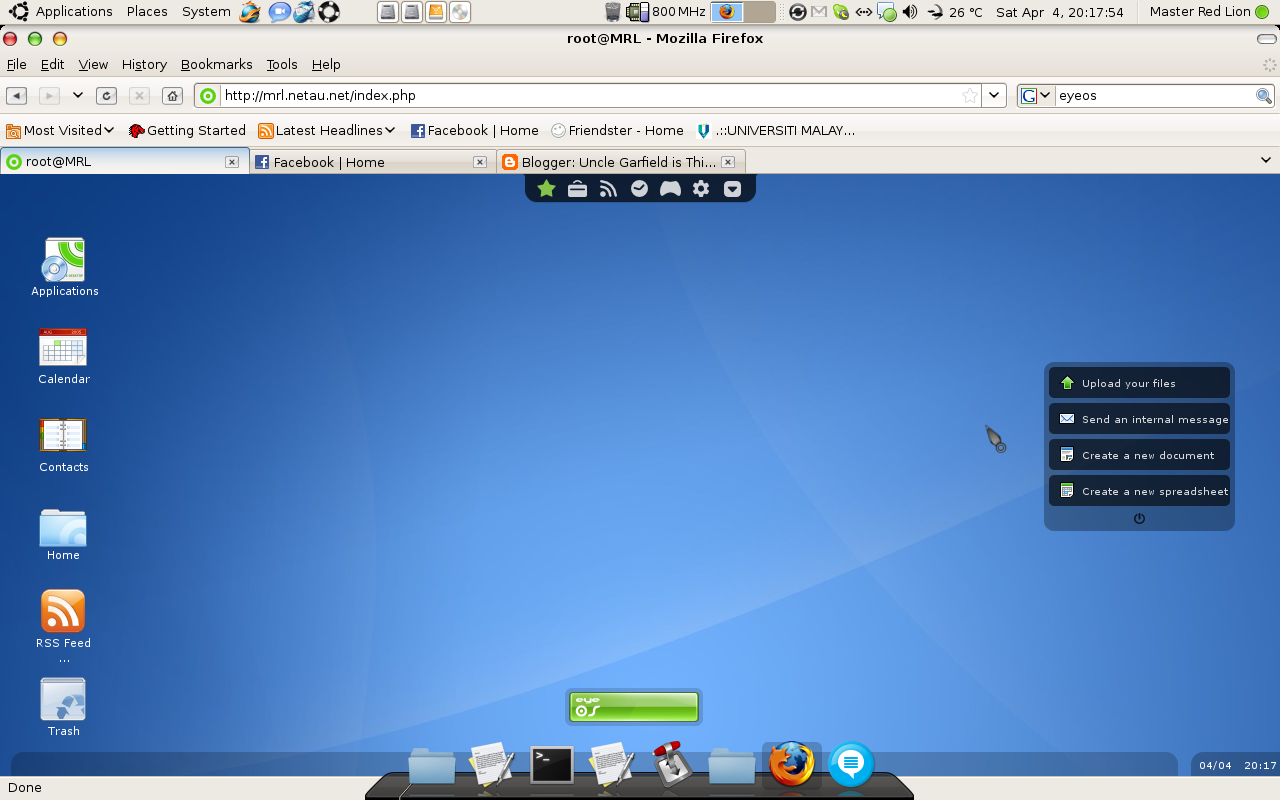
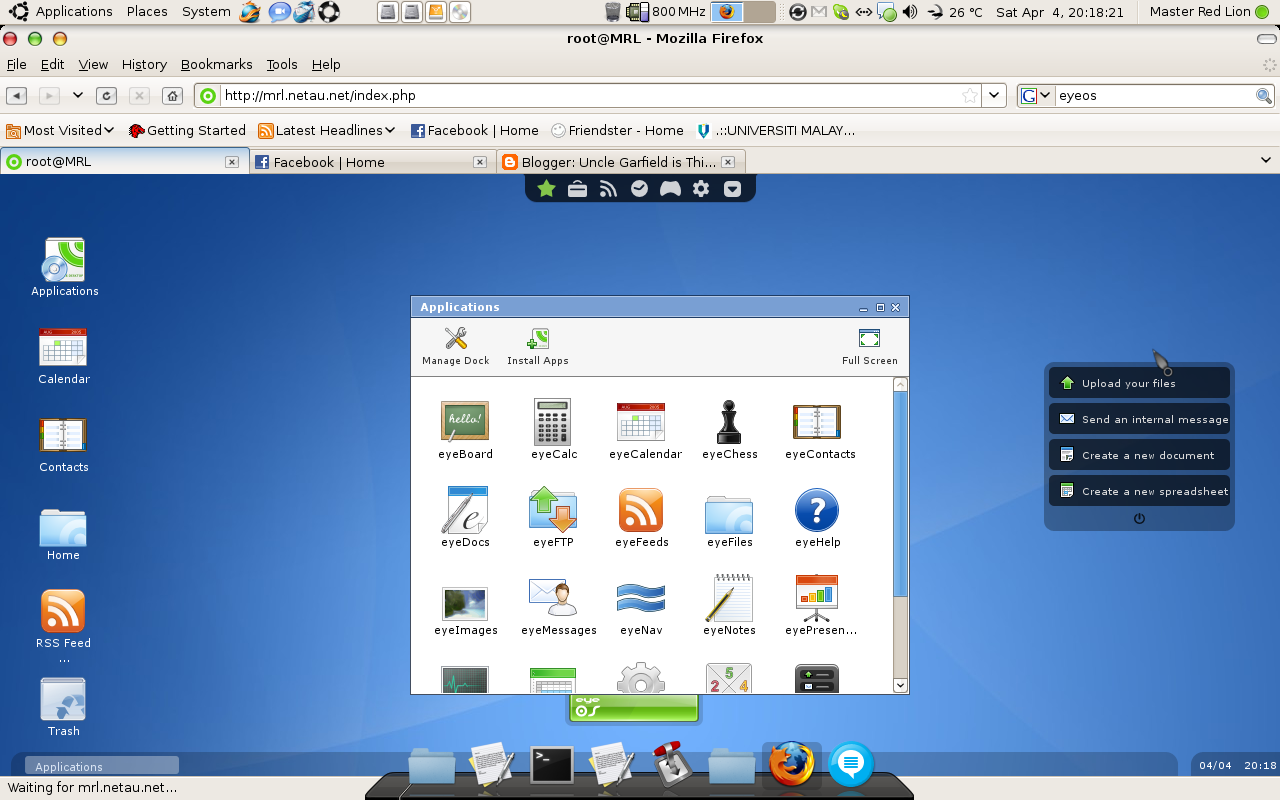
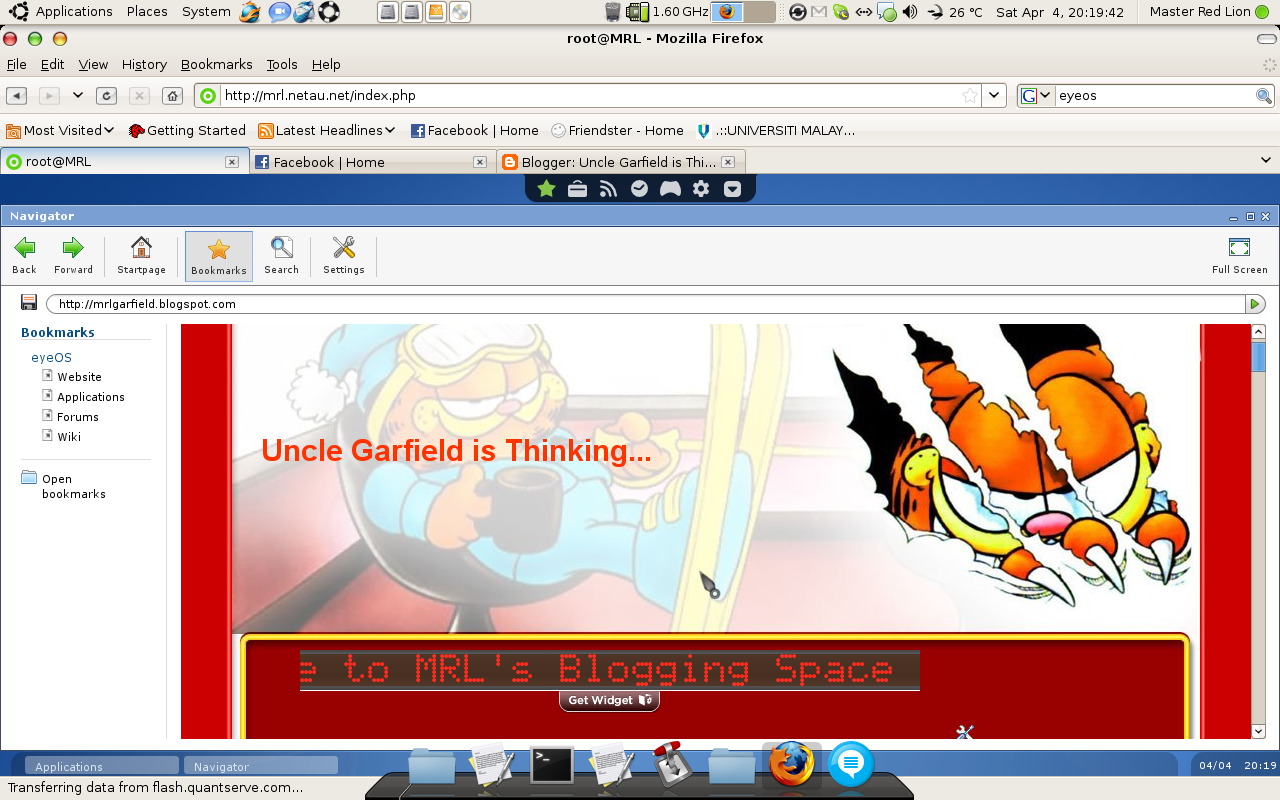
yup... i setup mine... and you can experience what is cloud computing actually is all about at MRL's System and below are some pictures of them... This system is powered by eyeOS

Right now, if you wanna have an access to my system you can have one account for your own... But, since the hosting is only have 1.5GB limited space only six lucky users will have their own account... and one person is limited to one account with 250MB storage (with only documents in your repositories, imagine how big 250MB is...) For those who are interested, please contact me at my Gmail.

For now, only basic functions is available like word processor, spreadsheet and some games... more features will be added after this.


This is it... Desktop in a browser... previewed in Ubuntu 8.10 Intrepid Ibex with Mozilla Firefox 3


Application Windows... You can install applications too...


Got browsers too.... Irrelevant features as you need a browser with PHP support for this... and yet, you get another browser in another browser...

Thursday, February 26, 2009

Logitech Extreme 3D Pro

Okeh... so, lately i've been thinkin.. how do it feel to fly a jet (of course in my laptop, otherwise i wouldn't been thinking about this...) with a joystick... and suddenly today, my friend wants to go to BJ and i said, why not... tag along with him and i can survey some joystick too... actually i surveyed the price of few sticks before... i can get good one around RM90-RM150 but since RM150 is quite hard on me, i might opt for RM90 models....

but, when i went to BJ... I saw this stick with very low price tag... the one that I saw in PC Depot and Lowyat is around RM90 they sold it at RM75+-.... damn, quite big difference... so, i ask about the one that is more advance and he can give me RM130... ok, the price is good... i like it... but then, go and survey some more, unfortunately no more shops have sticks on their shelves... after few stupid thinking, I go back to the shop and get one Logitech Extreme 3D Pro at RM129+RM2.58 coz i used Visa... hahaha...


upon return, i immediately open the packages and donwload the latest driver and software specifically for Vista (as one included in the CD is for XP and before and I doubt it will run)... after installation, i tested it with Wing Over Europe... few key re-mapping need to be done... but every function is recognized by the game... so far so good...

fly one fighter sweep sortie... what i found is, damn... i fly better... hahaha... every inch of my movement is input into the game accurately... i like it... eventhough my first encounter with enemy i panicked a little bit and drop the altitude from 9000ft to 1000ft... but everything start to act normal after a while and i manage to sweep all other aircraft perfectly... damn, this stick is good... i would recommend everyone who didn't have the budget to buy Saitek's stick or CH's sticks to buy this Logitech's... precision control is possible... would like to fly another sortie later...
It have 1 POV (point of view) or hat switch, 12 programmable button, 1 throttle slider and the you can twist the stick for rudder control... very good, plenty of button... the only drawback i found from my first use is the fact that the base is not stable enough that it could be lifted from the ground while pulling up the stick... while, at first i think twisting the stick for rudder control might give in false input while we actually are rolling but then i found it is very convenient features and i now can make better landing with fully control of rudder instead of maximum rudder when i need it (if it's boeing, i could crash from a hardover... lol...)

however, more interesting story is... i found out that this stick is even more expensive on Lelong.com's website... they selling this at RM149 while I actually get RM20 cheaper... is it i am lucky???

Thursday, January 22, 2009

My new headphone... Niceeeee~~~

last few months, my SonicGear HS800 got broken wire inside after a few rotation of the speaker part of the headset (i wonder why they use low quality wires while the design is adjustable...) and somehow i managed to repair it... but the replacement wire itself snapped again after a while... then i gave up on repairing it because it's not an easy task... without soldering paste, it's almost impossible... really....

so, yesterday... i go and find replacement for that headset... And I stumbled upon this Philips SPH2700 in KBJ and looked around to compare the price... the lowest I can find is RM85 and after some thoughts, i bought it anyway... based on the spec given on the box, it's freq response is 18Hz - 28kHz (yup, extra bass and extra treble) and the sensitivity is 104dB with 32Ohm impedance... maximum power output is 1.5W (i wasnt very clear on the last three features, i dont know what they do)... other than that, it provide me with 3.5mm to 6.3mm adapter and 3m cable length...


Okay, time for my review... i've heard few good things about Philips headsets, but i still doubt it... i got to try it for myself... back at home, i tried it and it does sound WOW!!!! whatever they say in the spec is true... yes, i dont have the tools to measure the freq response but i do heard sounds of musics that i haven't heard before with any other headset including SonicGear HS800 and it does sound great... i like this headset... whatever they said on the box, is most likely true... the extra bass and extra treble sounds from such instruments are clearly heard...

other features that i realized after using this that is not on the box is how lightweight it is... my last SonicGear HS800 used to be quite heavy and wearing it after a while actually make me tired... this headphone seems to be half of the weight of SonicGear HS800 and the only setbacks that you'll experience are it grabbed your ear quite tightly that u might feel uncomfortable at first and the size, you cant freely lying down with the headset on your head... well, all headsets are not designed for that purpose...

anyway, my conclusion... the powerful sounds + lightweight, it does makes RM85 looked cheap for this headset.. however, if it features gold plated jack instead of chrome plated, it will be more cool...

Sunday, January 18, 2009

Review on Microsoft Wireless Optical Desktop 700

About one week ago, I bought this Microsoft Wireless Optical Desktop 700 for RM90 at PC Depot... suprisingly, PC Depot is selling items at lowyat prices... haha... anyway, after a week using it you all might wanna know what do i think about it right??? I dont care if you dont care enough for that... I'll just keep on writing... hahaha...


Here it is... The first key features I was looking at is wireless/cordless... this feature is very important to me to reduce entangled wires/cables around my laptop. and this is very helpful... however, when it comes to wireless there will always certain performance issue like how far they can go and how fast the signal travels... will there be any certain latency or lag???

first of all, about how far the signal can go... suprisingly, this desktop set is totallly unlike other wireless device i have ever seen... even sensonic's wireless mouse is not up to par with this desktop set. I have tried to pull this keyboard and mouse together more than one meter from the receiver and the keyboard and mouse still get their job nicely done. Unlike other wireless device that priced almost RM50... they dont go too far in the signal... just enough for you to go around your laptop. I would say, this is good as I can be anywhere I like in my room without having to worry about losing control over my laptop.

then, how fast the signal travels... as far as i'm concern... extreme gaming needs for speed... lower latency device is good.... which, for gamers who play games up to international level, most wireless device is not good... thus, requiring them to opt for cabled keyboard (yeah, that's what Razer is doing) and mouse... however, suprisingly enough the mouse unit is moving faster and more sensitive than my A4 Laser Mouse... and the sensor can actually sense the movement even if the mouse is slightly airborne... not even my A4 Laser Mouse can do... so far, i've tried almost all surface including glossy surface, none of them cause the mouse failed to operate... I still have yet to try transparent glass and jubin though... most optical mouse failed to operate on these surface except my laser mouse... ooppsss... going to far away from topic... back to the speed of signal travel... the mouse and keyboard doesn't give big latency while I played Call Of Duty 2.... so, this desktop set is as good as wired ... games are playable, however for extreme gaming, for those who might have been used to Razer Lycosa or other gaming keyboard, dont get this one... latency will be your big issue...

Hotkeys... this keyboard have internet and multimedia hotkeys as well as calculator and my computer hotkeys... all my life, i've been using keyboard shortcuts very much since i used a laptop... the fact that i have to face when i bought a Compaq is that they dont have My Computer hotkeys while my old laptop, Hyundai M-Life got one... it is much easier to the access to My Computer that way rather than clicking Start Menu>My Computer... However, this keyboard have done it's favour to me... multimedia keys provided are play/pause, volume control, volume mute, and media player button... I would find that if there are next/previous button, it will be more usefull as i used them a lot... now, i have to click it at my windows media player instead of hitting a button on my keyboard even WMP is not an active window. as for internet hotkeys, we have email, home/web browser and favourite hotkeys... i dont use these as much... as I dont access email client that often on my laptop and also, i found that my web browser is running almost all the time...

other than that, they are pretty much like a normal keyboard and mouse, except they are wireless... and you are free to make it as bolster if you want... hahahaha....